My Role
UX Designer, Project Manager
Tools Used
- WordPress to build the website
- Figma to design wireframes
- FigJam for brainstorming and journey maps
- Google Forms for community surveys
- Google Sheets for project tracking and creating information architecture
- Stock Images for website image placeholders
- Images from community members to include in updated website
I was approached by a Martin Drive Neighborhood Association committee member about refreshing their community website. This project was taken on pro bono and redesigned with the future of the community and its communication needs in mind.
The Problem
The Martin Drive Neighborhood Association (MDNA) website was in need of a refresh. After years of inconsistent updates, I was approached by a committee member to breathe new life into a stagnant and cluttered website.
The Solution
An updated Martin Drive Neighborhood Association website that prioritizes the communication needs of the community.
The Process
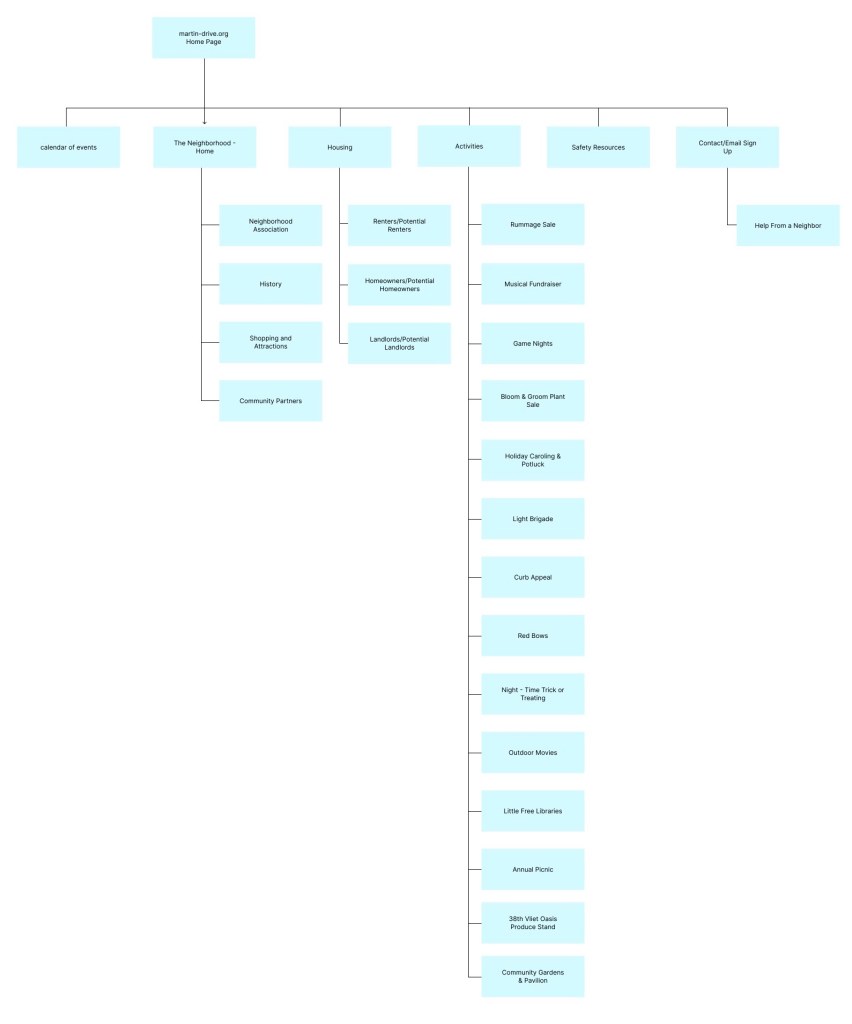
I spent time learning the existing website architecture by creating the content inventory of the existing pages and where they fit into the larger framework of the website.
I conducted user research to understand what pain points were felt by the community and what their needs were. The community is composed of residents, small business owners, and local alderpersons, all of whom were invited to take the survey that was disbursed to the community Google mailing list.
The following are insights from that survey:
- User Groups
- With knowledge of the community, I broke up the groups in such a way: New Residents, who tended to be younger and spent less time living in the neighborhood, and Established Residents, who tended to be older and spent more time in the neighborhood. Because of this trend, I broke the groups up by age. In the end there was a total of 24 respondents (7 New Residents, 17 Established Residents)
- Community Enjoyment
- Information and Resources
- 71% said they appreciate that it contains helpful information and resources
- History
- 29% said they love the pictures and history incorporated into the site
- Diversity
- 38% appreciate that the website Showcases Neighborhood Diversity
- Information and Resources
- Community Pain Points
- Disorganization, Cluttered and busy design
- 79% of respondents mentioned that the site is disorganized and are overwhelmed with how it is currently organized
- Mobile users
- 75% cited small text as an issue, pointing to issues with website responsiveness
- Difficulty Locating Specific Resources
- 29% cited frustration with signing up for the mailing list and/or cited lack of confirmation of sign up
- Outdated or duplicated information
- 83% of respondents cited frustration with outdated or duplicated information
- Disorganization, Cluttered and busy design
- Community Suggestions
- Updated business index
- Easier sign-up (both for mailing list and community activity volunteer sign-up)
- Section for community goals
- Interviews with neighbors
- Home button to get back home from any page
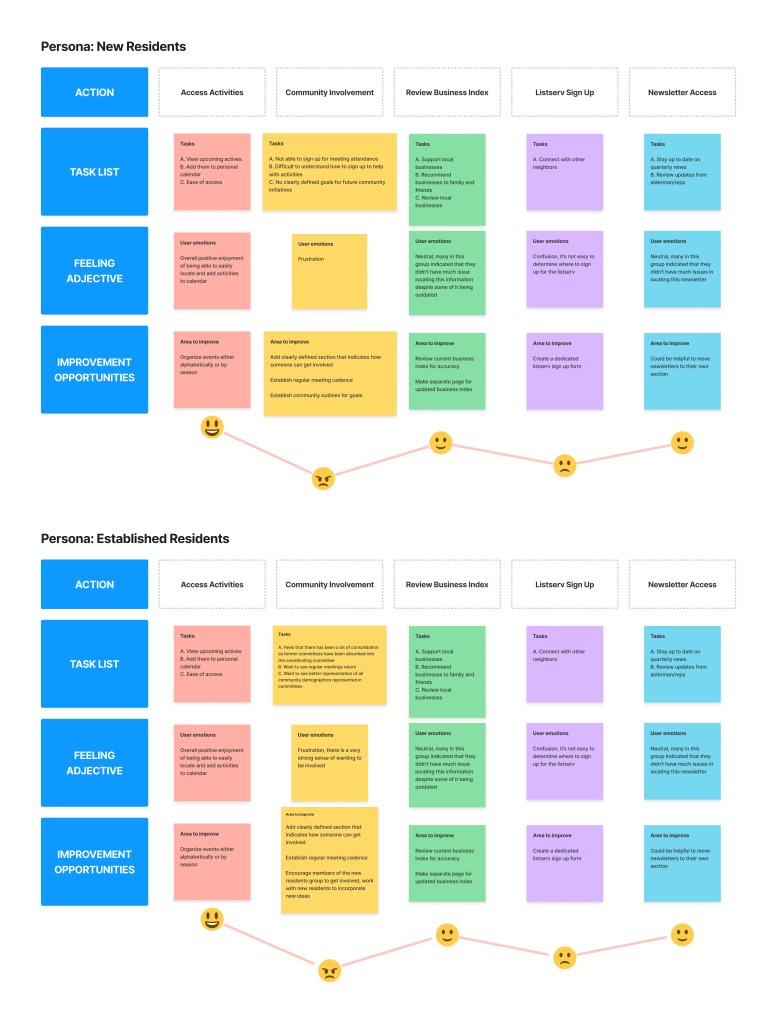
Based on the results of the first survey, I drafted user groups (personas) and journey maps to establish key demographics and understand a user’s journey throughout the website. Based on my survey groupings, I mapped out the following user groups:
New Residents (7 respondents)
- 45 and under
- Homeowners
- Favor mobile use
- 10 of fewer years in neighborhood
Established Residents (17 respondents)
- 46 and above
- Homeowners, landlords, and renters
- Favor desktop/laptop use
- 11 or more years in neighborhood
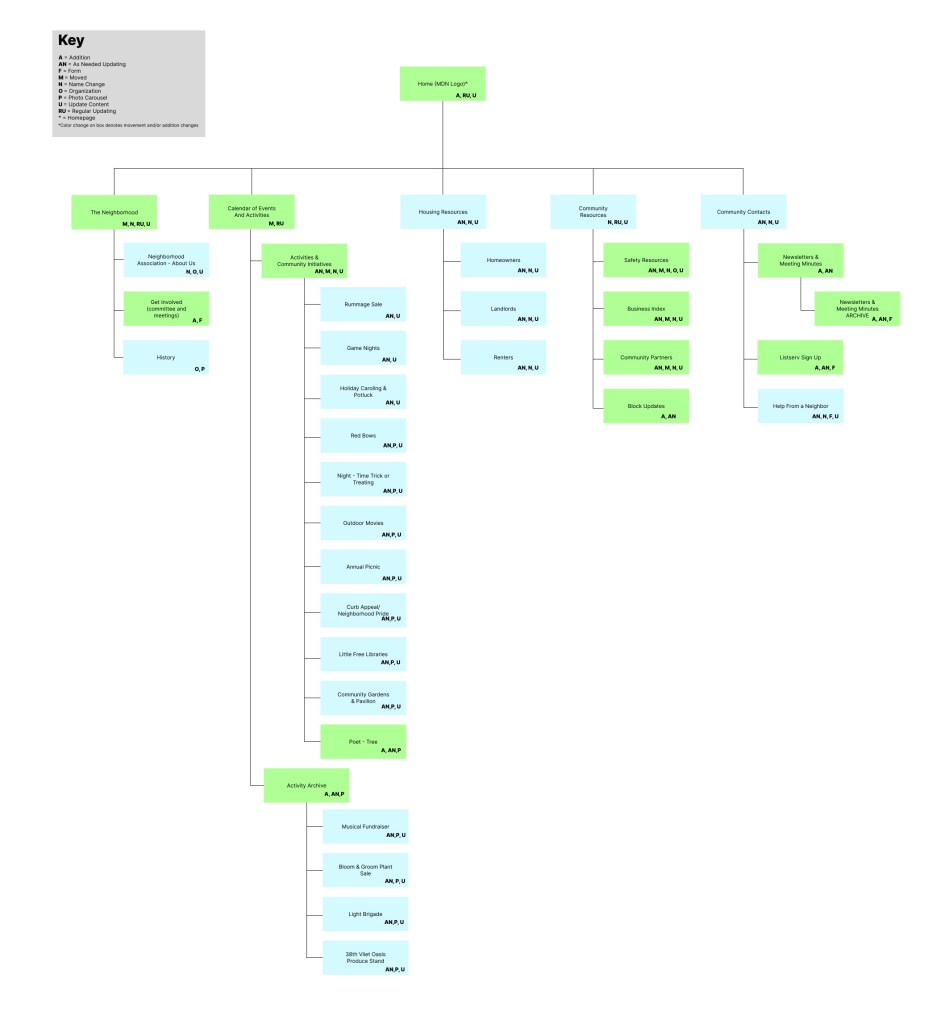
Following the initial survey and reviewing the responses from neighbors, I notated the information architecture to catalogue each existing page and spent time organizing each page into a newly appropriate category in a way that would best fit the needs of the community. This updated site map was approved by the Committee before I started working on the wireframes.
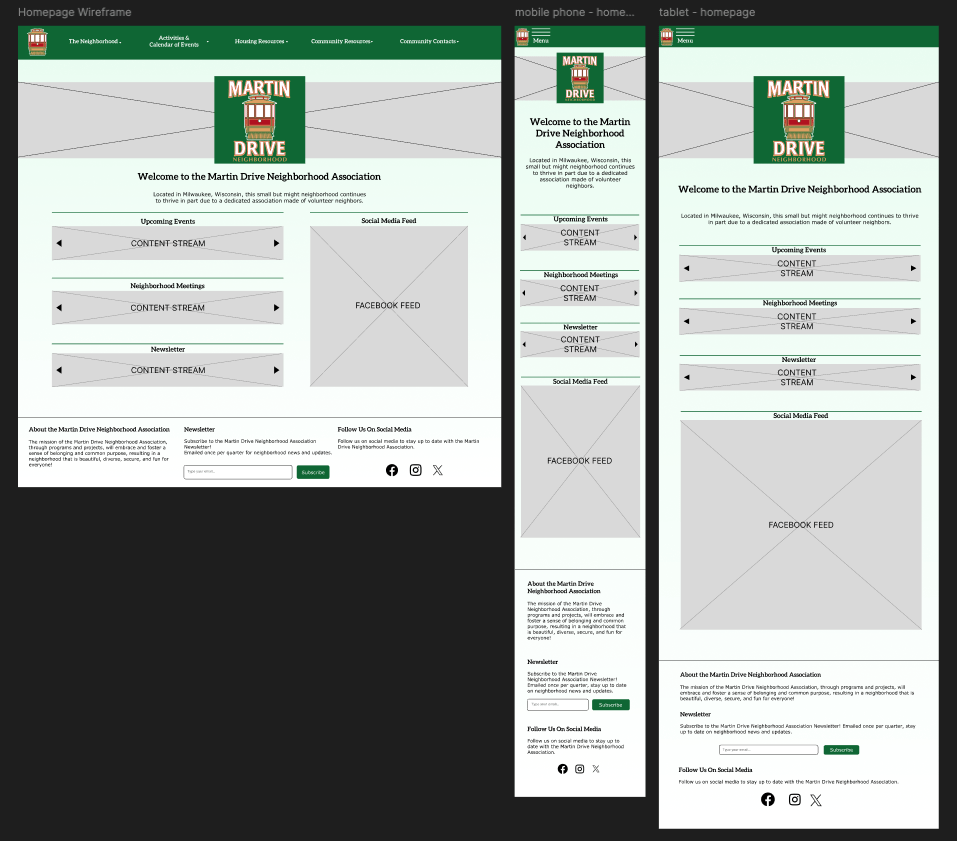
I drafted wireframes (view for all frames) based on preliminary feedback from what the community wanted to see. I took feedback from committee members on how they wanted the updated website to look and feel based on their expectations for how this website benefits the community. After 2 rounds of review, final wireframes were settled upon and used as the basis for building the website in WordPress.
I took the feedback from the community and built the updated community website in WordPress. The committee decided to work in WordPress because it offered affordable features and customizability needed to bring this updated to life. While this project is on hold, I have been putting work into finishing the design system and training a key community member on how to upload files to the website.
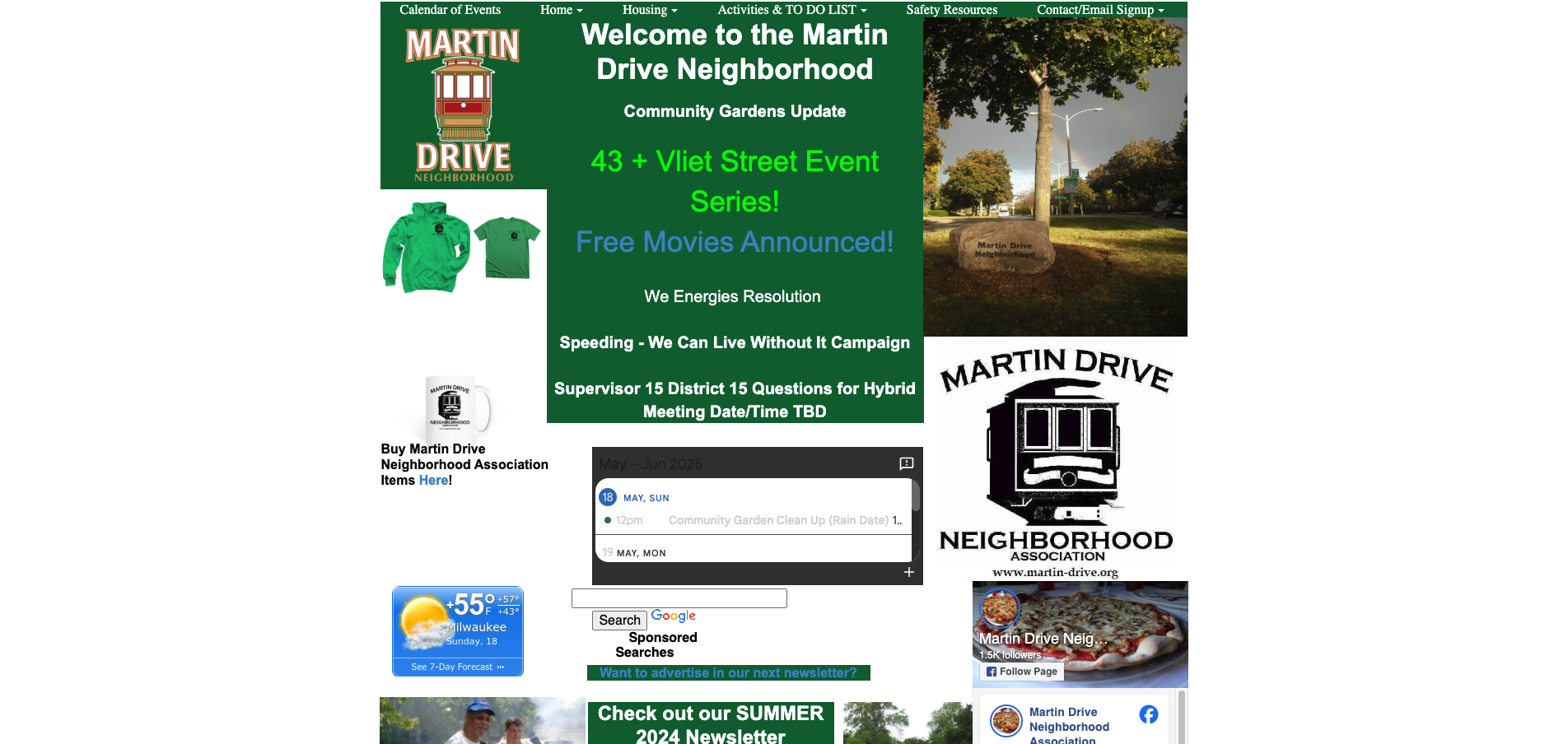
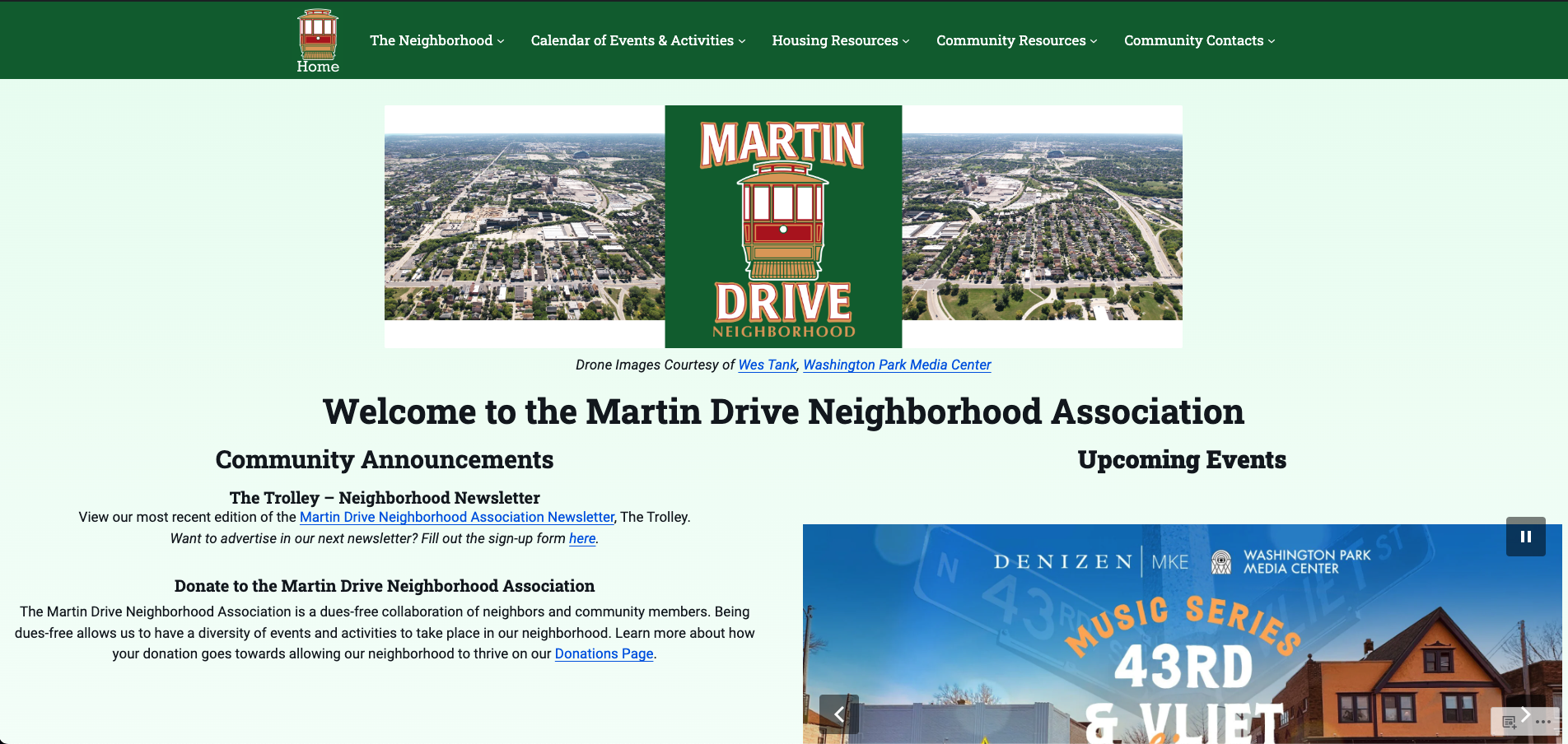
Takeaways and Next Steps
Takeaways
- Client Management
- This was my first UX project where I also had to manage client expectations. I took care to set expectations on communication cadences, established a project tracker, and held regular meetings all to ensure the committee’s needs were being met.
Because this project was taken on with an existing website in place, I had to be mindful of how I approached each change so as to not overwhelm the committee. While many of the committee members were supportive, one member could be a challenge to work with, and occasionally had differing expectations from the overall committee. I was able to manage this person’s expectations by engaging with a key community member to help me communicate and advocate for the intentions behind each choice. After having a discussion with this key community member, we were able to put a better communication plan in place and the work was able to proceed.
- This was my first UX project where I also had to manage client expectations. I took care to set expectations on communication cadences, established a project tracker, and held regular meetings all to ensure the committee’s needs were being met.
- Prioritization and Time Management
- I set up the project management aspect of this project and executed it without issue. Having project tracking documentation helped me keep a consistent pace with communicating updates and allowed me to keep track of the various moving parts of this project, which in turn allowed me to properly prioritize tasks.
This project was a larger undertaking than I originally expected. I learned to be more generous with my estimates when planning work in an area I wasn’t familiar with, and I was thankful to have a supportive and understanding community that appreciated the extra time I put into building out this project.
- I set up the project management aspect of this project and executed it without issue. Having project tracking documentation helped me keep a consistent pace with communicating updates and allowed me to keep track of the various moving parts of this project, which in turn allowed me to properly prioritize tasks.
Next steps
- Complete the Design System
- I began drafting a design system as I was designing the wireframes knowing that I would need this important piece of documentation to hand off to the committee. Once I began building the site in WordPress, I put the design system on pause to focus on project deliverables with the intent to come back and finish building the design system. Since WordPress offers templates and has auto-layout features, it allowed me to keep things consistent without having a fully realized design system in place.
- Finish adding files to website
- There is a wealth of historical knowledge on the MDNA site and one such historical item are agendas and minutes from previous community meetings. These files are ones that I do not have access to, but I have trained a community member on how to upload their copies of the files to the website.
- Conduct feedback with the community to understand how this refresh fits their needs
- This crucial step is on hold until I can find a time to meet with the community to assess how this updated website fits their needs and expectations.
- Facilitate training with key committee members tasked with maintaining the website
- This step will be done in the same weekend that I conduct user testing to collect feedback. It is important to train these identified committee members on how to update and maintain the website so that these updates can benefit the community for years to come.
 Oriana Dentici